Doctoral Dissertation · KAIST GSCT · 2026

Make a gesture easy to do and easy to recognize — at once.

On everyday smartglasses, input lasts seconds and your attention is elsewhere. I make those seconds reliable with system-guided gesture input: rather than classify whatever motion arrives, the system shapes the action before, during, and after it, using only the smartwatch you already wear.

Why it matters Wearable gesture input fails twice over: users must remember what to do, and the system must tell a command from walking or hand-waving. Shaping the motion answers both, and I test it while people walk and attend to other tasks.

Juyoung Lee · KAIST GSCT Advisor: Prof. Woontack Woo 4 studies · ISMAR, TVCG/VR, AHs 14+ peer-reviewed papers · 470+ citations · h-index 12
Scroll
See the interaction

The guidance, the motion, the confirmation

Tap a clip to open its project page and watch the guidance on screen, the wrist motion, and the haptic confirmation.
Each project page on juyounglee.net gives the study's method, apparatus, and footage.
The moment

Everyday input is momentary, eyes-up, and fragile

Glance at a notification while walking. Send a quick reply in a meeting. Confirm a step the AI suggests while cooking. Each lasts seconds, so what matters is not capability but flow.

Recall

With nothing on screen to show the options, users must remember each gesture. Norman warned that gestures are hard to discover.

False input

Walking, eating, and talking make motion that looks like a command and can trigger one by accident.

No look-back

Input must work without recall, precise aiming, or a fixed gaze, and confirm itself without a second glance.

The argument

Everyday gestures need two commitments, kept together

Accuracy in a fixed posture is not enough. The thesis rests on a design principle and a standard of evidence; neither suffices alone.

Design principle

Guided input shaping

The system guides what the user does before, during, and after input, so that one action is easy for a person to perform and easy for a recognizer to separate from background motion. Unlike active perception, it shapes the user's action, not its own sensing.

Standard of evidence

Everyday validation

I test each technique during walking, divided attention, and incidental movement, with three measures: user-independent accuracy, success on an obstacle task under load, and false positives from natural motion in everyday scenarios.

The principle in motion

Guidance enters the loop at three moments

Cues before input shrink Norman's gulf of execution; feedback after shrinks the gulf of evaluation. Each study targets one moment.

1
Before input
Show the action

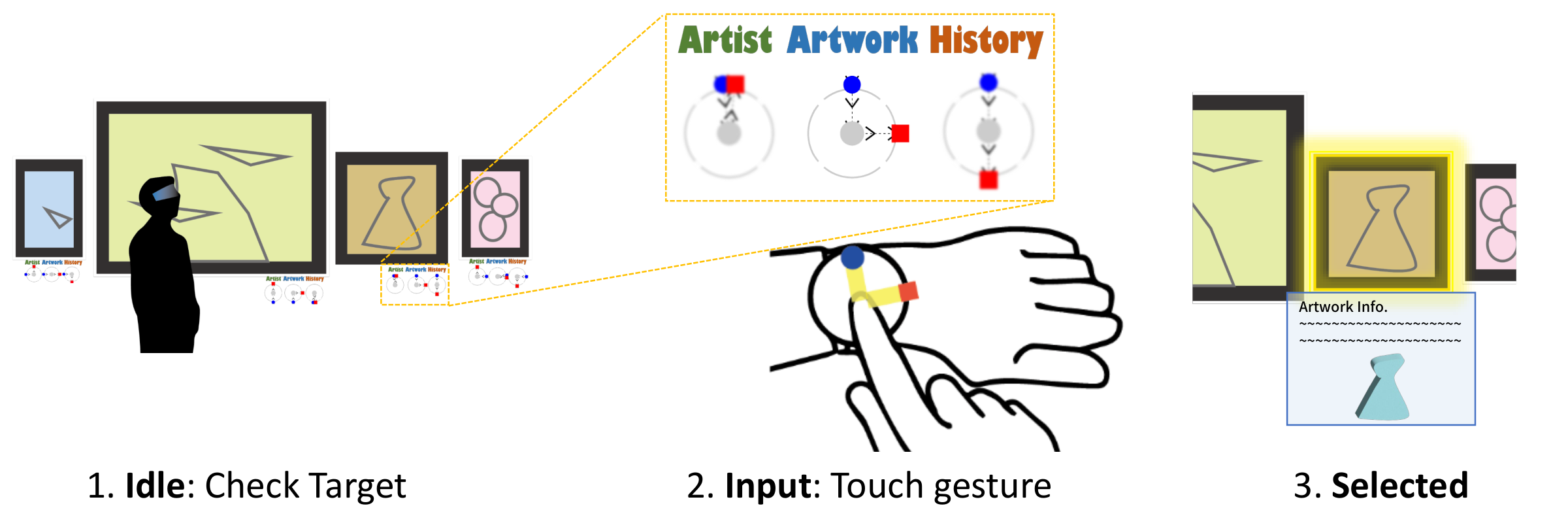
Visual marks and touch traces show what actions are available, so there is no vocabulary to recall.

Gulf of execution ↓
2
During input
Shape the motion

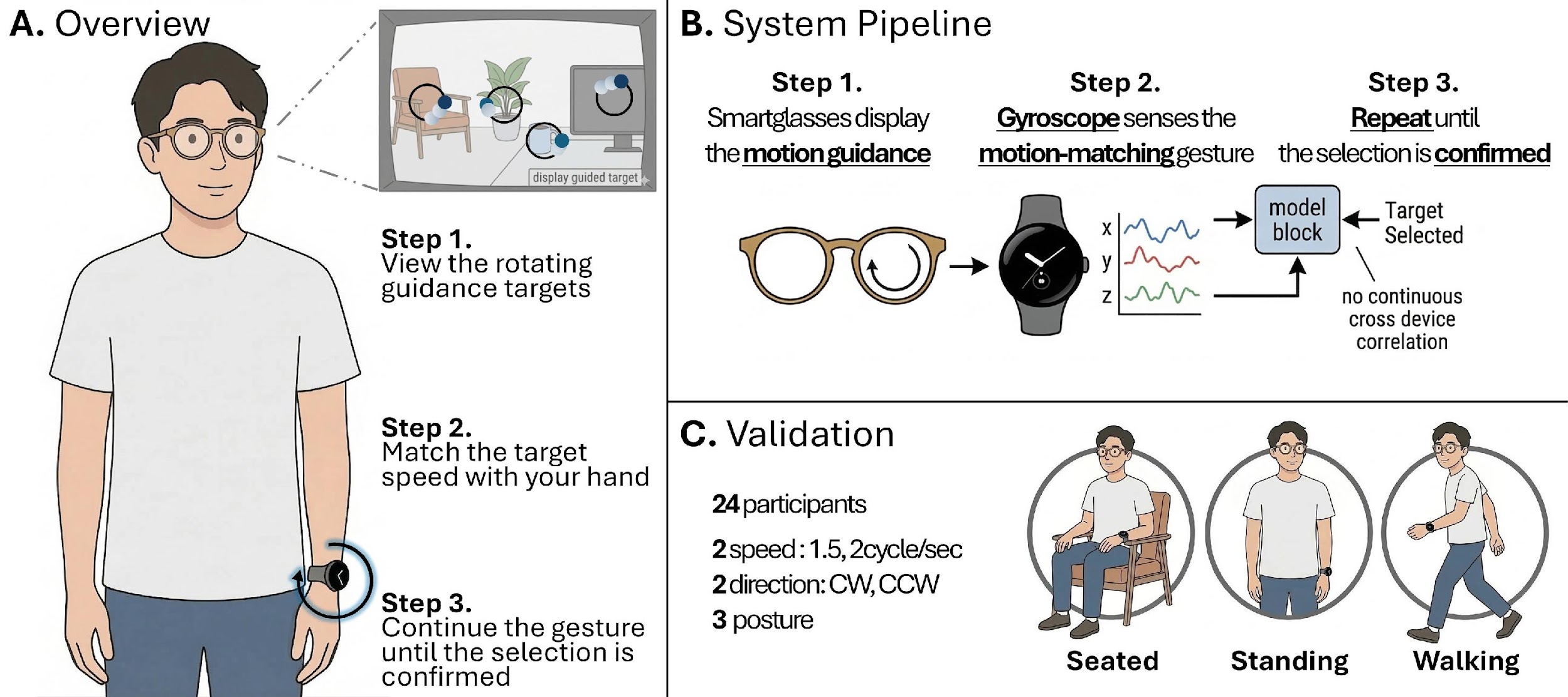
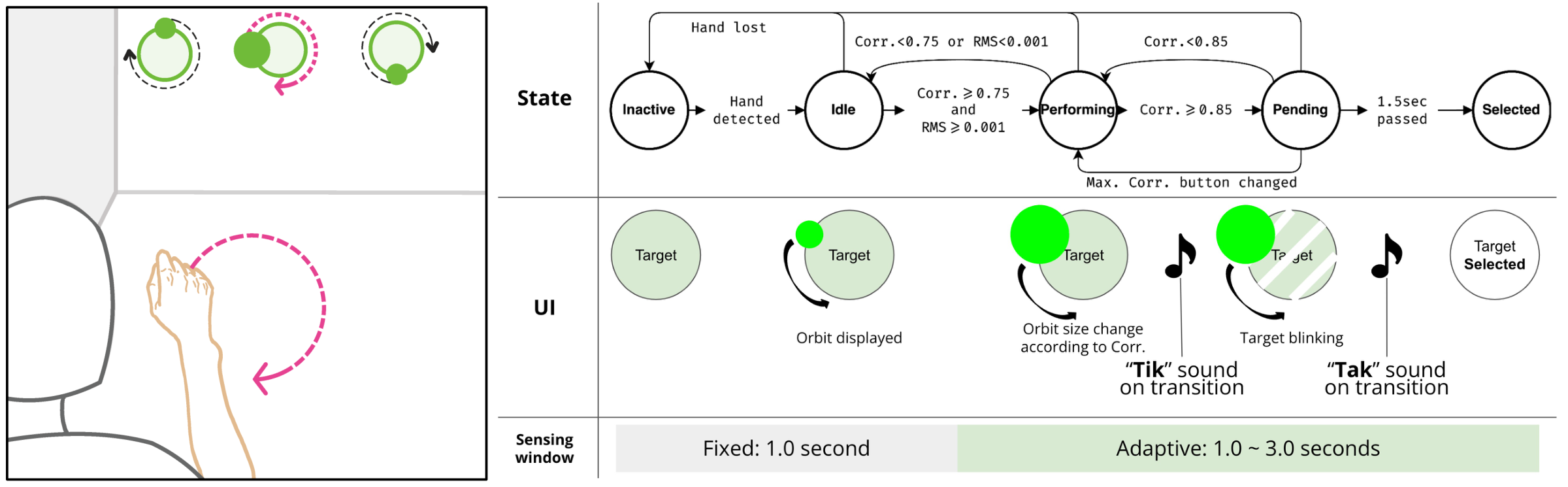
Following a moving target replaces precise aiming with synchronization and gives the recognizer the signal it expects.

Signal design
3
After input
Confirm the result

A wrist pulse confirms the accepted action, so the user need not look back at the display.

Gulf of evaluation ↓
Core finding

Shape the action, not the sensor.

Guidance helps both sides of recognition at once. It eases the user's recall burden by making actions visible, and the system's sensing burden by turning motion into a pattern the recognizer expects. The gain comes from arranging the interaction, not from better classifiers or more sensors.

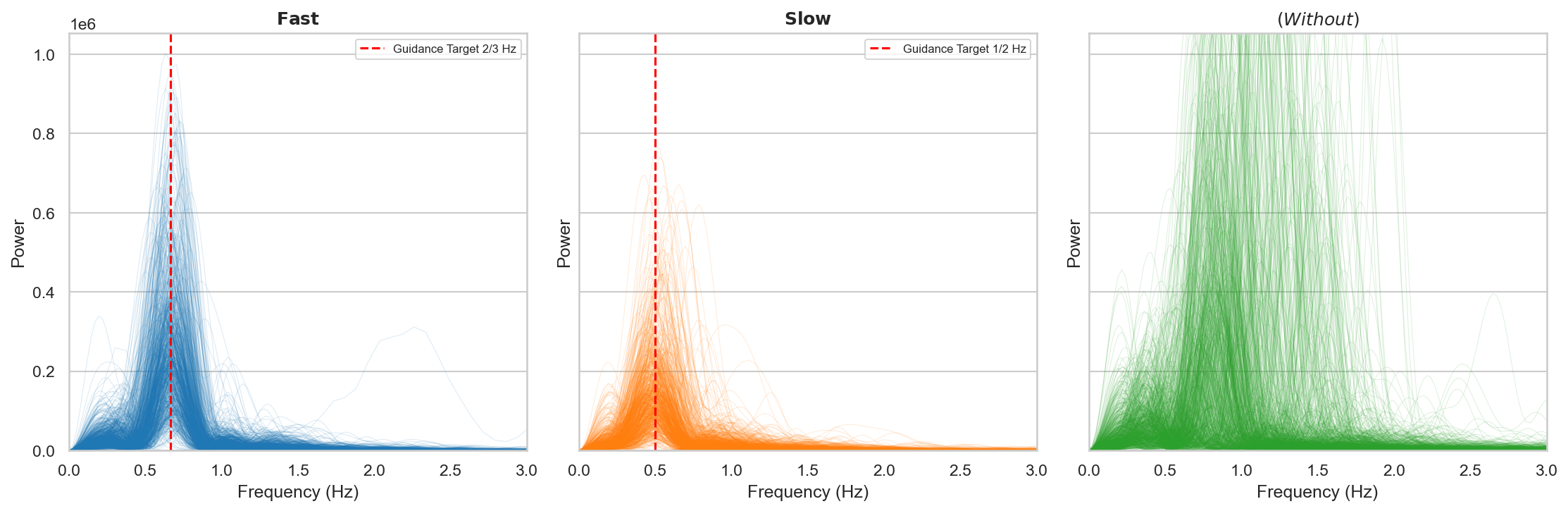
Frequency spectra of wrist motion: guided motion peaks at the guidance frequency, unguided motion spreads widely
Wrist motion with guidance (fast, slow) locks onto the guidance frequency; without it, the spectrum spreads. That narrow peak is what the recognizer keys on.

1Before: less to remember

Touch traces and visual marks lower perceived workload under divided attention, even where success and time differ little.

2During: a separable signal

Guided motion gives a cleaner IMU signal than unguided motion (p<.001) and the fewest false activations of any gesture tested.

3After: confirm without a look

Event-based wrist haptics make confirmation clearer and the experience better, most of all for complex actions such as turning a knob.

✓One device, three roles

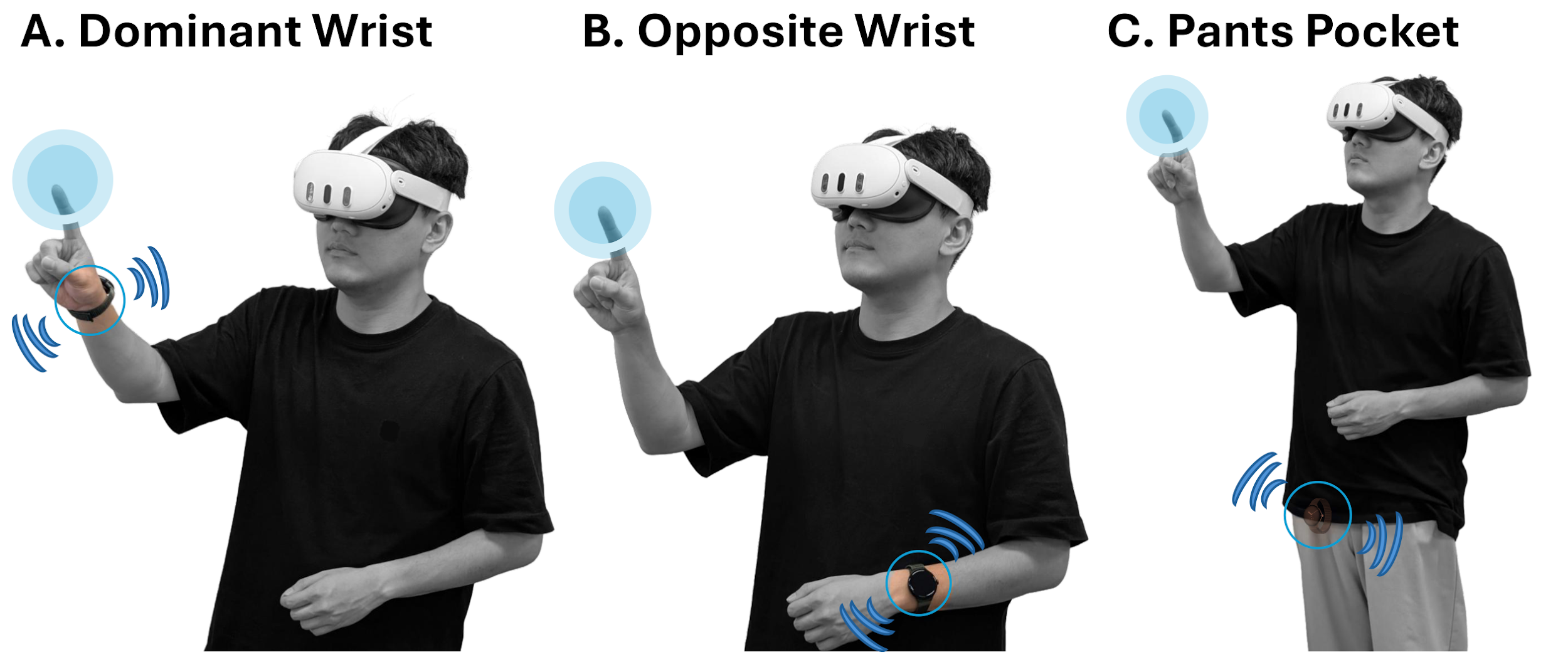
The smartwatch already on the wrist serves as touch surface, motion sensor, and haptic actuator. The whole loop runs on commodity hardware, with no new device to buy or charge.

!Limit: walking erodes fine guidance

Guided wrist motion with four choices weakens while walking; a two-choice, direction-only mode stays robust. The design rule follows: offer richer menus when the user is still, and only confirm or dismiss when moving.

!Limit: incidental motion needs caution

Everyday movement forces conservative acceptance rules, which trade missed attempts against accidental activations. Where to strike that balance depends on the task and context.

The studies

Four studies, one loop

Each study places guidance at one moment of the loop. The cards give the headline result; each links to its paper or project page.

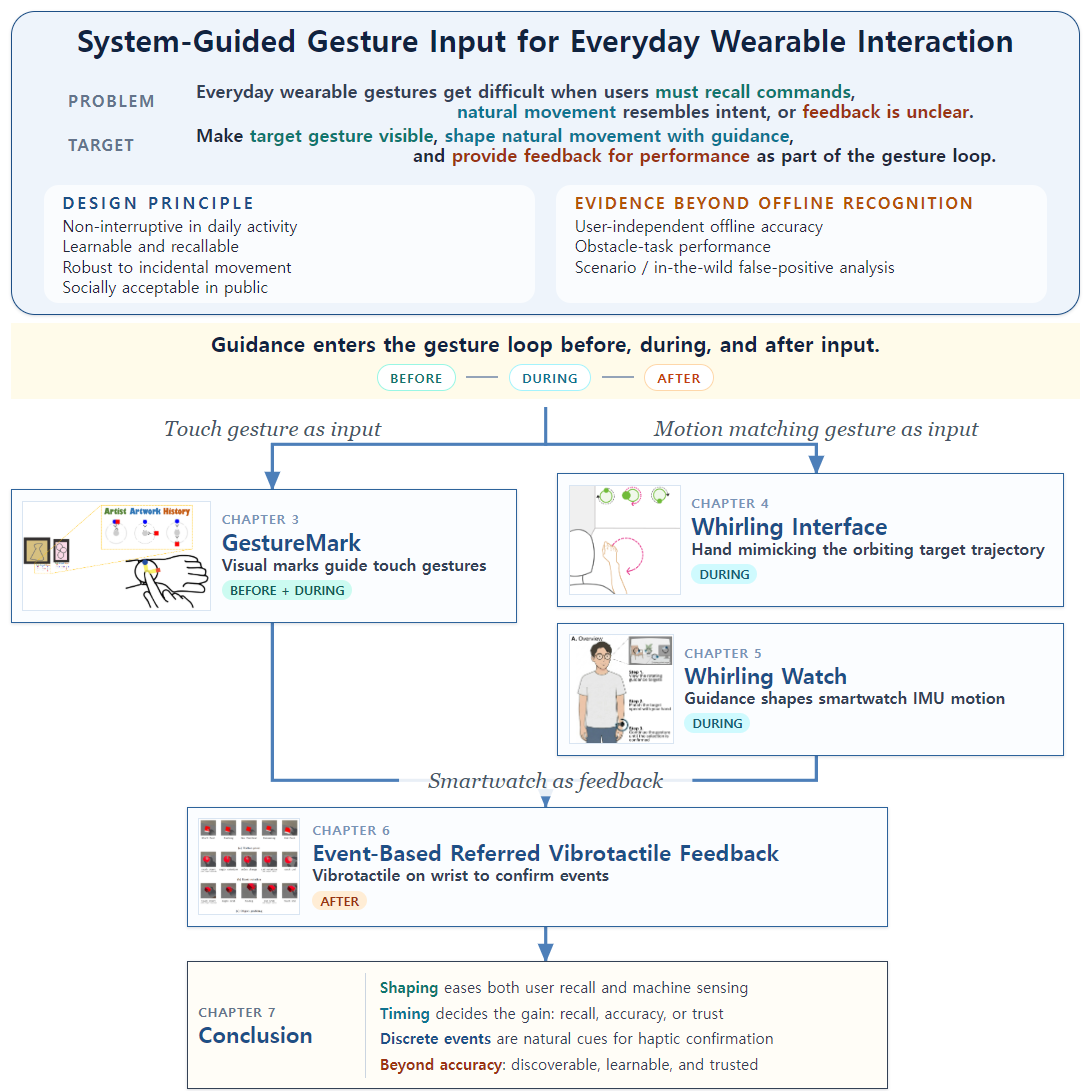
Dissertation overview: problem, design principle, evidence, and four chapters placed before, during, and after input
Positioning

Where existing methods fall short

Ray casting struggles with small, distant targets; shortcut gestures must be memorized; direction menus offer few choices. Each has its place, but none serves the whole of a brief, eyes-up moment. Guided input shaping answers all three in one loop.

Loop moment Raycasting Shortcut gesture 4-dir menu Guided input shaping
Before · show action Point at target Recall fixed gesture Coarse 4-dir set Cue is the target
During · execute Hard on tiny / far Pinch / tap Easy but coarse Copy / match motion
During · reject false motion Pointer slips on commit Needs distinct gesture/button Depends on direction set Fewest false activations in study
After · confirm — — — Wrist pulse, no look-back

Columns stand for families of methods; their weaknesses come from the literature, not reruns. Following a moving target builds on smooth-pursuit selection (Pursuits, 2013; Orbits, 2015); what is new is its use as signal design for a wrist IMU, tested while walking.

From research to product

What's validated, and what's next

The loop runs on hardware people already wear. Here is where it stands.

Validated today

Commodity hardware, user-independent recognition

The studies use commercial watches and smartglasses (Pixel Watch 3, Epson Moverio). Recognition is user-independent but runs offline on recorded sensor streams.

Next phase

Toward a real-time field deployment

Two steps remain: run recognition live on the device, then hold a longitudinal field trial with more varied users, wrist placements, and daily motion, to see whether the false-activation rate holds beyond the recorded scenarios.

Status: a validated research prototype, not a product. I graduate in 2026 and seek roles as a research scientist or senior HCI engineer in wearable and XR input, and welcome industry collaboration, pilots, or licensing.